> For the complete documentation index, see [llms.txt](https://luw-ai.gitbook.io/luw.ai-app-docs/llms.txt). Markdown versions of documentation pages are available by appending `.md` to page URLs; this page is available as [Markdown](https://luw-ai.gitbook.io/luw.ai-app-docs/edit-images/magic-prompt-ai.md).

# Magic Prompt AI

Edit any photo with a written instruction, with optional reference images, three engines, 2K or 4K output and a choice of aspect ratio.

Magic Prompt AI edits a photo from a written instruction. Say what to add, remove or change, for example "add a tall fiddle leaf fig plant next to the window", and you get the edited photo back. No design skills needed.

<figure><img src="https://1930792265-files.gitbook.io/~/files/v0/b/gitbook-x-prod.appspot.com/o/spaces%2F4yESzclcaZeSiIDZ8eIa%2Fuploads%2Fgit-blob-b6ef89a30f15d95d0050e646d13ef1c0a39bf9c2%2Fmagic-prompt-result.webp?alt=media" alt="Two versions of the same hotel bedroom side by side: on the left the original, on the right the same room with a tall fiddle leaf fig plant in a pot next to the window"><figcaption><p>Before and after the prompt "add a tall fiddle leaf fig plant next to the window". The rest of the room stays the same.</p></figcaption></figure>

## What you need

* A photo. See [Uploading images](/luw.ai-app-docs/working-with-images/uploading-images.md) for the file types you can use.
* A prompt. Magic Prompt needs both: without a photo you'll see "Waiting for image", and without a prompt "Required: Prompt".
* Optional: up to six reference images, such as a piece of furniture or a material you want in the picture.

## Edit a photo

1. Open **Magic Prompt** from the Dashboard (app.luw\.ai/magicprompt). It's also the first tool you see when you open **All Tools**.
2. Upload your photo. When the upload finishes, the form moves to **Customize and Generate** by itself.
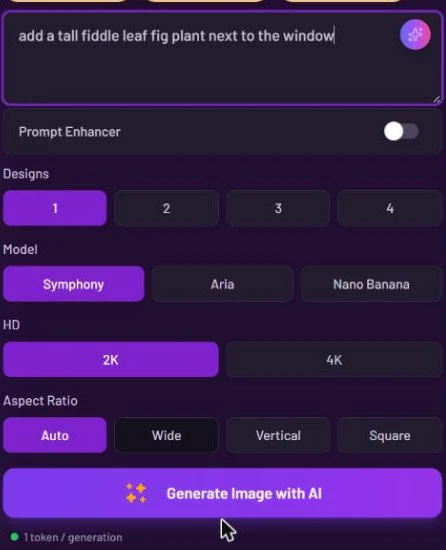
3. Write what you want in the **Prompt** box.
4. Optional: add reference pictures in the **Add Extra Images** slots.
5. Choose the number of **Designs**, the **Model**, the **HD** size and the **Aspect Ratio**.
6. Press **Generate Image with AI**. Your results appear in **Latest Designs** below the form. Click one to open it in the [result viewer](/luw.ai-app-docs/results/result-viewer.md).

<figure><img src="https://1930792265-files.gitbook.io/~/files/v0/b/gitbook-x-prod.appspot.com/o/spaces%2F4yESzclcaZeSiIDZ8eIa%2Fuploads%2Fgit-blob-c6f4b28d85423af7e911bb67f6671dacc0021604%2Fmagic-prompt-settings.webp?alt=media" alt="Magic Prompt settings with the prompt add a tall fiddle leaf fig plant next to the window, Prompt Enhancer off, Designs, Model with Symphony, Aria and Nano Banana, HD 2K and 4K, and Aspect Ratio Auto, Wide, Vertical and Square"><figcaption><p>Magic Prompt offers a third engine, Nano Banana, and an Aspect Ratio setting.</p></figcaption></figure>

### Add reference images

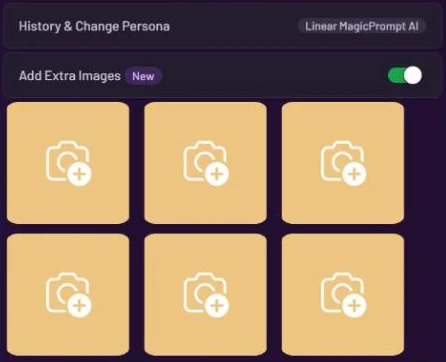
**Add Extra Images** is on by default in Magic Prompt and gives you six image slots. Click a slot to add a picture, then say in your prompt what to do with it.

<figure><img src="https://1930792265-files.gitbook.io/~/files/v0/b/gitbook-x-prod.appspot.com/o/spaces%2F4yESzclcaZeSiIDZ8eIa%2Fuploads%2Fgit-blob-d60bd0017321f463ae5f470b2edbe8fb838a8a2d%2Fextra-images.webp?alt=media" alt="Add Extra Images switched on with six empty image slots below it"><figcaption><p>Six slots for reference images.</p></figcaption></figure>

## Settings

| Setting                      | What it does                                                                                                               |
| ---------------------------- | -------------------------------------------------------------------------------------------------------------------------- |
| **History & Change Persona** | Switches to another persona or starts a new one. See [Personas and history](/luw.ai-app-docs/getting-started/personas.md). |
| **Add Extra Images**         | Six slots for reference images. On by default here.                                                                        |
| **Prompt**                   | Your instruction. Required.                                                                                                |
| **Prompt Enhancer**          | Rewrites your prompt into a fuller one before generating. Off by default here.                                             |
| **Designs**                  | How many results to make: 1, 2, 3 or 4. The free plan makes 1.                                                             |
| **Model**                    | **Symphony** (default), **Aria** or **Nano Banana**. All three cost the same.                                              |
| **HD**                       | Output resolution: **2K** or **4K**. On the free plan the output is 0.5K and 2K/4K are locked.                             |
| **Aspect Ratio**             | The shape of the result: **Auto** (default), **Wide** (16:9), **Vertical** (9:16) or **Square** (1:1).                     |

[Prompts, styles and settings](/luw.ai-app-docs/working-with-images/prompts-styles-settings.md) explains the shared controls in detail.

## Credits

Each design uses 1 credit ("1 token / generation"). With **HD** set to **4K**, each design uses 1 more credit. Making several designs multiplies the cost.

## Tips

* Write one clear instruction that says what and where, such as "add a tall fiddle leaf fig plant next to the window".
* Not happy with a result? Try another **Model**; switching between Symphony, Aria and Nano Banana doesn't change the price.
* Need a prompt idea? The sparkle button in the prompt box opens ArchiGPT, which writes a prompt for you (it asks you to confirm first: "1 token = \~3000 words").
* To change one exact spot, mark it first with [Magic Wand AI](/luw.ai-app-docs/edit-images/magic-wand-ai.md).
* You can also run Magic Prompt on a finished result: open it and choose **AI-Powered Magic Edit** → **Magic Prompt AI**.

## Related

* [Magic Wand AI](/luw.ai-app-docs/edit-images/magic-wand-ai.md)
* [Uploading images](/luw.ai-app-docs/working-with-images/uploading-images.md)
* [Credits and engines](/luw.ai-app-docs/getting-started/credits-and-engines.md)
* [Edit and reuse a result](/luw.ai-app-docs/results/edit-and-reuse.md)